



Are you curious to know about Dynamics 365 Storage costs and limits? Welcome to our quick guide on Dynamics 365 Storage! With an ever-increasing amount of data, it is essential to understand how to manage your storage while controlling your finances effectively.
This article will explore Dynamics 365 storage costs, capacity and additional storage costs in Australia. By the end of this guide, you will have a comprehensive idea about managing your storage efficiently regardless of your business’s size.
But before diving deep into the Dynamics 365 storage, let us first give you a brief idea about Dynamics 365. Microsoft Dynamics 365 is an intelligent business application suite comprising ERP and CRM solutions to streamline business activities and enhance the customer experience for optimum growth. It enables enterprises to achieve scalable transformation.
Why Do We Need Dynamics 365 Storage?
Now that we have established the fundamental concept of Dynamics 365, we are ready to dig deeper. Due to the rapid digitalisation of businesses, data needs are increasing tremendously. To remain relevant, modern business applications must adapt to changing circumstances of managing new data and comply with complex regulatory requirements.
Therefore, there is a need for continuous improvement of data storage to meet the evolving demands of organisations and offer appropriate solutions to accommodate their expanding needs. Microsoft Dynamics 365 provides a reliable and secure database with ample storage capacity to ensure seamless business operations.
With this storage, customers can store and manage various company data, including files, attachments, photos and videos. Additionally, it allows recording data changes over time for future analysis and reporting.
What are the Storage Capacities of Dynamics 365?
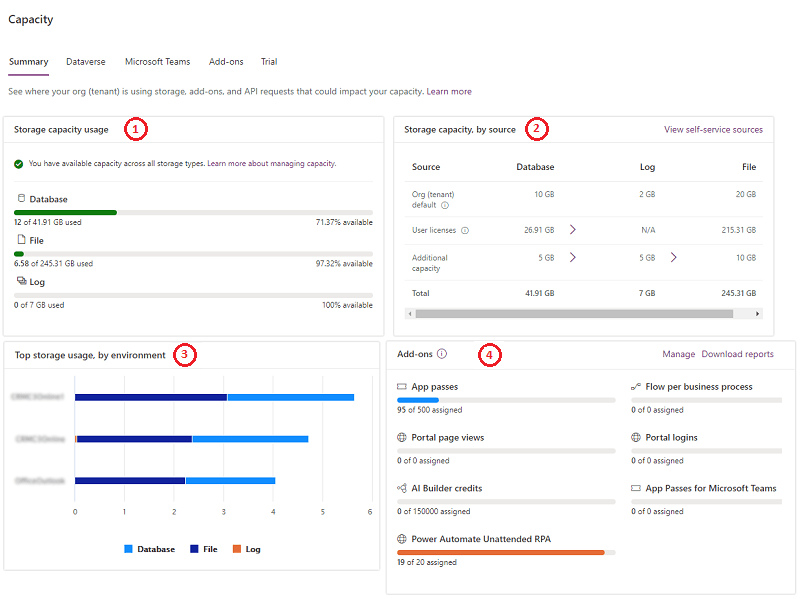
Users who are new to the Microsoft Dynamics 365 suite of applications receive three kinds of storage by default: Database capacity, File capacity and Log capacity.
Database Capacity
It consists of Metadata, including CRM records such as accounts, contacts, entities, and workflows. You will get 10 GB of database capacity by default and an incremental capacity of 250 MB for each full-access user.
File Capacity
It incorporates file attachments to your emails, notes, appointments, videos, images, etc., in addition to data capacity. It offers 20 GB of file storage capacity by default, with an additional capacity of 2GB per licensed user.
Log Capacity
It offers storage to record logs, track reports, audit history, and attribute data with 2 GB log storage by default. There is no additional log capacity storage per full-access user.
Microsoft Dynamics 365 Pricing

The Dynamics 365 pricing may differ based on the location, sales channels, or territories. When it comes to the Dynamics 365 implementation pricing structure, it is flexible because users have the option to subscribe solely to the applications they want.
Dynamics 365 Pricing in Australia (Base License) - Prices in AUD excl. VAT |
|||
|
Features/ Solutions |
Price (Per user/month) | Features/ Solutions |
Price (Per user/month) |
| Customer Service
Professionals |
$68.70 | Business Central
Essentials |
From $96.10
|
| Customer Service
Enterprise |
$130.40
|
Business Central
Premium |
From $137.30
|
| Sales Professionals | $89.20 | Finance | $247.10 |
| Sales Enterprise | $130.40 | Supply Chain
Management |
$247.10 |
| Sales Premium | $185.40 | Project Operations | $164.80 |
| Microsoft Relationship Sales | $181.15 | Human Resources | $164.80 |
| Microsoft Viva
Sales |
$54.90 | Commerce (Retail) | $247.10 |
| Field Service | $130.40 | Fraud Protection | $1373 per tenant/month |
| Remote Assist | $89.20 | Guides | $89.20 |
| Marketing | From $1647.60
per tenant/month |
Intelligent Order
Management |
From $411.90 per 1000 orders lines/month |
| Customer Insights | $2059.50
per tenant/month |
||
Table 1: Dynamics 365 Pricing Structure in Australia
Contact a Dynamics 365 Consultant at Dynamics Square, Microsoft Dynamics 365 leading Partner in Australia, for updated pricing.
Dynamics 365 Additional Storage Cost

Each user license in Dynamics 365 comes with a specific amount of storage space per user, based on your plan. If you need more storage, you can purchase additional storage per GB.
It is essential to keep track of your current storage capacity before purchasing extra storage to assess your requirements. If your storage limit exceeds 50%, the admins in your company receive a notification.
The following structure offers a comprehensive view of Dynamics 365 additional storage costs in Australia.
|
Capacity |
Cost per GB (AUD) |
| Database Storage | 55 |
| File Storage | 3 |
| Log Storage | 14 |
Table 2: Dynamics 365 Additional Storage Costs in Australia
Conclusion
In conclusion, I advise you to understand your storage needs to control your expenses in the future. If you are worried about Dynamics 365 storage cost, you can review your usage regularly and adjust accordingly.
In case of any doubt, please don’t hesitate to contact the team of experts at Dynamics Square. With the right approach, you can utilise and maximise storage capacity and enjoy the benefits of the innovative Dynamics 365 suite of applications.
Contact Dynamics 365 Support Now
Transform Your Business Today with Dynamics 365